Gameplay Features
Gameplay Features add part-scoped actions such as firing a cannon, opening a hatch, or activating a tool. Use an Assembly Controller for continuous vehicle control, and a Gameplay Feature for a discrete action owned by one Part.
Create a Gameplay Behavior Feature
- Create a Blueprint class derived from CAT Part Gameplay Feature.
- In Class Defaults > Input Actions, add the Input Actions handled by the Feature. CAT creates a matching
CAT Input Action: ...event node in the Blueprint. - Implement the action with the owning Part context, such as
Get Part World Transform. - Open the Part Model, add Gameplay Behavior in the Features panel, and select the Blueprint as its Feature Class.
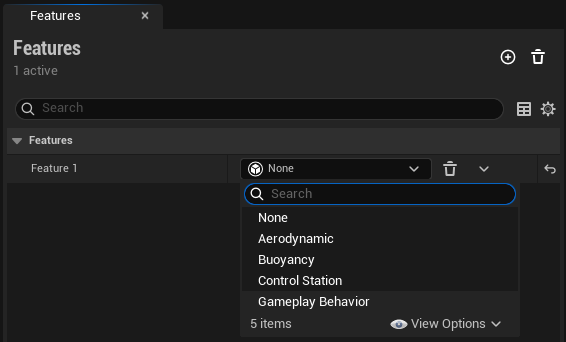
The Input Action must also be mapped by an active Enhanced Input Mapping Context. When a player controls an Assembly containing this Part, CAT forwards the action to the Feature automatically.
Example: Fire a cannonball
This example uses SM_CannonBall as the projectile mesh.
- Create a Boolean Input Action such as
IA_Fireand map it to the desired key in the project's Input Mapping Context. - Create an Actor Blueprint named
BP_Cannonball. Add a Sphere Collision root, a Static Mesh component usingSM_CannonBall, and a Projectile Movement component. - Create
BP_CannonFireFeaturefrom CAT Part Gameplay Feature and addIA_Fireto Input Actions. - From the
Startedpin ofCAT Input Action: IA_Fire, get the Part world transform, apply a local muzzle offset, and spawnBP_Cannonballfrom that transform. - Add the Gameplay Behavior to the cannon barrel Part and select
BP_CannonFireFeature. In the Assembly Editor, select that Part and click Upload to Source Part to write the change back to the source Part Model.
For a projectile that breaks CAT structures, handle the Sphere Collision component's hit event on the server. Use the impact point as the center of a CAT Radial Detach Request, call Detach Relations In Sphere on the CAT Assembly Detach Subsystem, then destroy the projectile.
Detach Relations In Sphere removes nearby CAT Assembly relations. It does not damage an unrelated Static Mesh Actor or split a single-Part Assembly.
Lifecycle and context
On Feature Activatedinitializes temporary state.CAT Input Action: ActionNamereceives the configured action value and trigger events.On Feature Deactivatedclears timers, delegates, and temporary resources.
The Feature can access its owning Assembly and Part, Feature ID, active Control Station Part, control instigator, and owning Part world transform.
Continuous input
Gameplay Features are intended primarily for actions such as fire, activate, or release. Use an Assembly Controller for sustained physics control such as driving, steering, or attitude control.
Input and authority
Gameplay Feature actions are delivered to the authoritative Assembly. Spawn replicated projectiles and perform structural operations such as radial detach on the server. Direct Feature Input Actions use reliable delivery.
Legacy semantic Input Slots, Part-level Input Bindings, and CAT Gameplay Input nodes remain readable for existing assets. New Gameplay Features should declare Input Actions directly in their Blueprint Class Defaults.